
Product variants: the detail that decides both the sale and the ranking
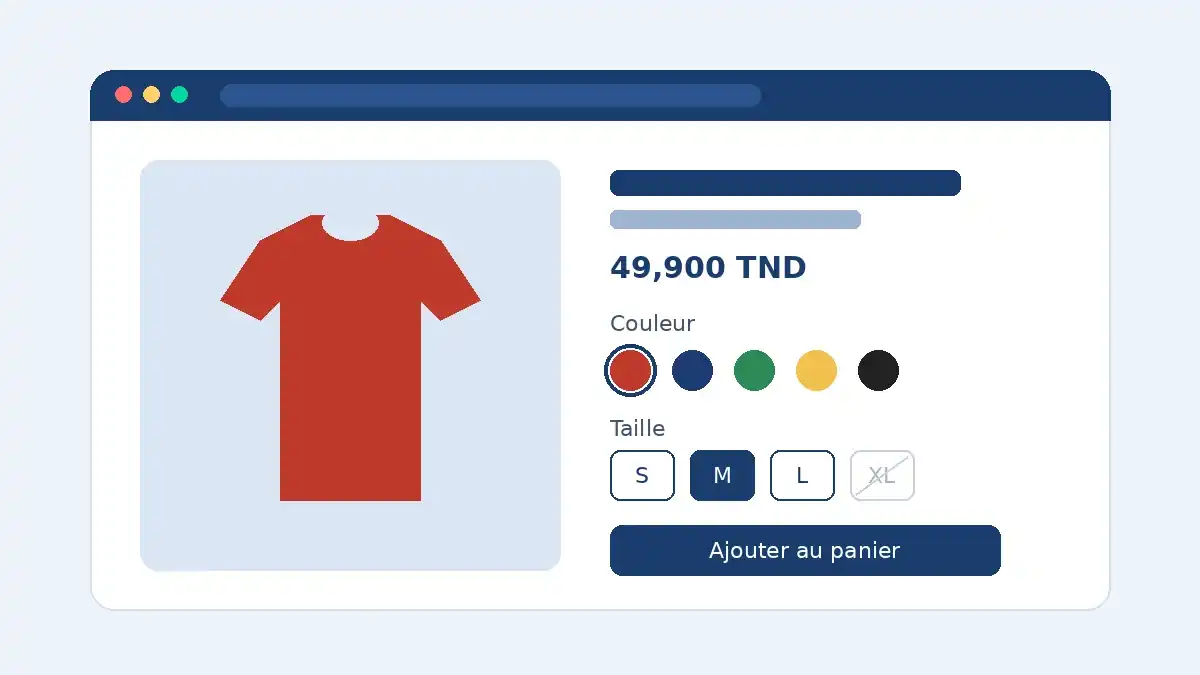
Handling ecommerce product variants well means grouping sizes, colors and materials on one clear product page, showing the right price, photo and stock for every combination instantly, and giving Google consistent URLs and structured data. Handled badly, variants create duplicate pages, abandoned carts and listings Google struggles to understand.
A t-shirt in six colors and five sizes is thirty variants. A sofa with three fabrics, four colors and two sizes is twenty-four. Behind every combination sits a SKU, a stock level and sometimes its own price and photo. How your store organizes those variants affects how easy it is to buy, how clean your Google Shopping feed is and how your pages rank.
This guide is for store owners, marketing teams and startups selling on WooCommerce, Shopify or Webflow. It builds on our ecommerce product schema guide.
Why product variants are a UX, SEO and engineering problem
Variants touch three parts of your store at once:
- The buying experience: shoppers need to find their size or color effortlessly, see straight away whether it is in stock and see what it looks like.
- Search: every variant can generate a URL. Without clear rules, Google crawls near-identical pages and struggles to pick the main one.
- Engineering: each platform caps options and variants differently, and a product with hundreds of combinations can slow the page down.
Baymard Institute's research shows the basics are still often missed: 12% of benchmarked sites still list every variant as a separate product in category pages, cluttering the results, according to Baymard's article on combining variations into one list item.
One product page for all variants, or one page per variant?
This is the first decision, and everything else follows from it. There is no universal answer: it depends on how your customers search.
| Criterion | One page with variants | One page per variant |
|---|---|---|
| Typical case | Sizes, minor color differences | Colors or models people search for by name |
| Example query | "organic cotton t-shirt men" | "white Nike Air Force 1" |
| Reviews | Consolidated on one page | Split unless you pool them |
| SEO risk | Low with a clean canonical | Duplicate content if the copy is identical |
| Content needed | One description | Unique copy and photos per page |
The default: one page, several variants
For most stores, a single product page is the right call. Sizes in particular almost never deserve their own URL: nobody searches for "blue shirt size 16" in enough volume to justify a dedicated page. One page concentrates links, reviews and popularity signals on a single URL.
When a variant deserves its own URL
A separate page makes sense when a color, finish or edition is searched for in its own right and you can give it genuinely distinct content: its own photos, adapted copy, a specific title. If you go this way, link the pages together with clickable swatches so shoppers can switch colors as if they were on one page. Google supports both architectures in its product variant structured data documentation.
Variant UX: 7 rules for a product page that converts
- Swatches, not dropdowns. Show colors as visual swatches and sizes as buttons, so every option is visible at a glance.
- A clear out-of-stock state. A sold-out size should be crossed out or greyed, not silently removed. Offer a back-in-stock alert.
- The photo follows the color. Attach at least one image to every color. Nothing creates doubt faster than a red swatch next to a blue photo.
- Price and stock update live. If a larger size costs more, the displayed price must change instantly, without a full reload.
- No add to cart without a selection. If no size is chosen, highlight the selector with an explicit message instead of a vague error.
- A size guide where the doubt appears. Put the link right next to the size selector.
- Variants visible from the category page. According to Baymard's mobile benchmark, 57% of sites don't show all color swatches in their mobile product lists, even though shoppers use them to compare.
These rules belong in a wider conversion rate optimization process: test them on your most visited product pages before rolling them out everywhere.
Variant SEO: URLs, canonicals and structured data
A URL that preselects each variant
For product pages that group several variants, Google recommends that each variant be reachable through a URL that preselects it, usually with a query parameter (?variant= on Shopify, ?attribute_pa_color= on WooCommerce). That URL must show the right photo, price and availability. It is also the URL you will use in Google Shopping campaigns.
One canonical for the whole group
On a single product page, every variant URL points its canonical tag to the base product URL, so Google doesn't index dozens of near-identical versions. If you chose one page per variant, each page keeps its own self-referencing canonical instead.
ProductGroup markup
Since 2024, Google supports the ProductGroup type to describe a set of variants. The key properties are:
productGroupID: the group identifier, often the parent SKU;variesBy: the attributes that change, such as size or color;hasVariant: the list of variants, each described as aProductwith its own SKU or GTIN, price and availability.
Always validate the output with Google's Rich Results Test, and check that your theme and an SEO plugin aren't generating two competing blocks of markup.
The Merchant Center feed
In Google Merchant Center, each variant is a separate item, tied to its siblings by the item_group_id attribute. Each item's link should point to the URL that preselects that variant. Our Google Merchant Center product feed guide covers the setup.
Setting up variants on WooCommerce, Shopify and Webflow
| Platform | Main limit | Watch out for |
|---|---|---|
| WooCommerce | No hard cap, but dynamic dropdowns only up to 30 variations by default | Performance on heavily varied products |
| Shopify | 2,048 variants per product | Limited number of options; Combined Listings is Shopify Plus only |
| Webflow | 3 option sets and 50 variants per product | Hard to manage large, highly varied catalogs |
WooCommerce: variable products and the 30-variation threshold
In WooCommerce, you build a variable product from attributes. Use global attributes (Products > Attributes) rather than custom ones: they are reusable, filterable on category pages and easier to maintain.
One technical detail has a big UX impact. According to WooCommerce's official documentation, variation dropdowns are only dynamic up to 30 variations. Above that, they turn static: shoppers can pick a combination that doesn't exist and get "Sorry, no products matched your selection." A developer can raise the threshold with a filter, at the cost of a heavier page. For visual swatches, most themes still need a variation swatches plugin or custom development.
Shopify: 2,048 variants and Combined Listings
Shopify raised the limit from 100 to 2,048 variants per product for all merchants, as announced in its 2025 developer changelog. Variants can be preselected with ?variant=, and modern themes canonicalize to the product URL. Options can also be connected to category metafields so the same colors are reused across your catalog, as explained in Shopify's help center.
To sell each color as a separate product while showing them on a shared page, Shopify offers the Combined Listings app, available on Shopify Plus only: up to 60 child products per parent, each keeping its own images and URL.
Webflow: 3 option sets, 50 variants
Webflow Ecommerce allows up to 3 option sets and 50 variants per product, according to Webflow's help center. Variants inherit the product's image, SKU and price, which you can override one by one. To make a combination unselectable, turn on inventory tracking and set its quantity to zero. These limits suit a brand with a short range; for a highly varied catalog, read our breakdown of Webflow Ecommerce limitations first.
Example: an apparel brand growing its color range
Take an illustrative case: a fashion brand sells a t-shirt on WooCommerce in 6 colors and 5 sizes, which is 30 variations, exactly at the dynamic dropdown threshold. Next season it adds a seventh color, taking it to 35 variations. Nobody notices, but the dropdowns turn static and customers start selecting sold-out combinations.
The typical fix:
- Replace dropdowns with color swatches and size buttons that grey out unavailable combinations.
- Attach a photo gallery to each color.
- Keep one product page, canonicalized to the base URL, with variant URLs for Google Shopping.
- Add ProductGroup markup and item_group_id in the feed.
- Show swatches on category pages too, as covered in our category page SEO guide.
Product variant checklist
- A clear decision: one page or one page per variant, based on real search demand.
- Global attributes and consistent naming across the catalog.
- Visual swatches, visible out-of-stock state, a photo per color.
- Price, stock and SKU updated on every selection.
- A preselecting URL for every variant, canonicalized to the base product.
- ProductGroup markup validated, with no duplicate blocks.
- Merchant Center feed with item_group_id and links to the right variants.
- Platform limits checked before adding new options.
- Mobile page speed rechecked after every major addition.
Conclusion: well-structured variants sell more
Variants are usually configured once at launch and then forgotten. Yet they decide how clear your product pages are, how clean your Google index stays and how well your Shopping campaigns perform. A sound architecture, a few UX rules and clean markup are enough to turn a confusing selector into a selling point.
Our team builds and optimizes WooCommerce, Shopify and Webflow stores for brands in Europe and Tunisia. Explore our WooCommerce development services and our ecommerce website development, or send us your store URL for a product page audit.