
Ecommerce product filters: faceted navigation UX and SEO
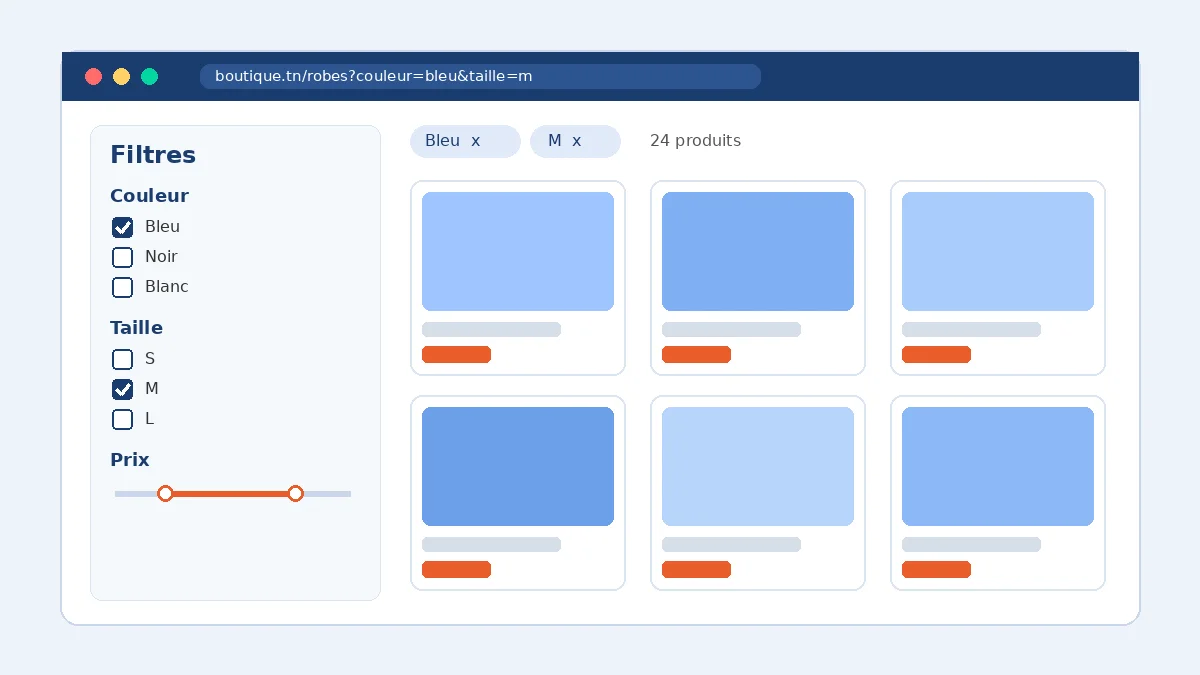
Good ecommerce product filters mirror the criteria shoppers actually use to choose (size, color, price, compatibility), show which filters are active and work just as well on mobile. On the SEO side, only a handful of high-demand combinations should become indexable pages. Every other filter URL should be blocked from crawling or consolidated, or Google will burn its time on thousands of near-duplicate pages.
Once a catalog grows past a few dozen products, the category page turns into a sorting tool. Without relevant filters, visitors scroll, give up and leave. With poorly configured filters, it is Googlebot that gets lost in a maze of URLs.
It is a common problem. Baymard Institute's 2025 Product Lists & Filtering benchmark rates 58% of desktop sites and 78% of mobile sites as "mediocre" or worse for product list UX. This guide is for store owners, startups and marketing teams on WooCommerce, Shopify or Webflow who want filters that help customers without undermining organic search.
What is faceted navigation?
Faceted navigation lets shoppers narrow a product list by combining criteria: "dresses", then "blue", then "size M", then "under $50". Each criterion is a facet, and each option within it is a value.
In most implementations, every combination produces its own URL, such as /dresses?color=blue&size=m. With 8 colors, 6 sizes, 5 price bands and 3 sort orders, a single category can already generate hundreds of URLs. That is where user experience and technical SEO collide.
Why product filters matter for conversion
In Baymard's usability testing, sites with mediocre product list usability saw abandonment rates of 67–90% among participants trying to find a product, compared with 17–33% on sites with only a slightly optimized filtering toolset (Baymard). These are lab test results rather than a guaranteed uplift, but the gap shows what is at stake.
A good filter answers the question a shopper would ask a sales assistant: "Do you have this in a 10?", "What works with my iPhone?", "What have you got under $100?". If the answer takes ten minutes of scrolling, the sale is gone.
Product filter UX best practices
Offer category-specific filters
Generic filters like category and price are not enough. Each product family has its own deciding factors: size and width for shoes, compatibility for tech accessories, skin type for cosmetics, dimensions for furniture. Baymard found that 38% of sites do not offer filters for all the information shown in product list items (Baymard research). If you display capacity or brand on the product card, shoppers should be able to filter by it.
Allow multiple values within a filter
A shopper torn between black and navy should be able to tick both. That means "OR" logic within a facet and "AND" logic between facets (black OR navy, AND size M). According to Baymard, 15% of sites do not support this.
Show applied filters and make them easy to remove
An overview of applied filters, shown as removable chips, stops visitors from forgetting a criterion and concluding you have "nothing in stock". 32% of sites in Baymard's benchmark do not offer one. Add the result count and a "Clear all" button.
Avoid dead ends
Hide or grey out values that would return zero results, or show the product count next to each value. A filter that leads to an empty page is more frustrating than no filter at all.
Design for mobile first
On smartphones, filters usually open in a drawer. Keep the "Filter" button visible, show the result count on the apply button ("Show 24 products") and keep filters applied when a shopper comes back from a product page. Our guide to mobile ecommerce UX covers these patterns in more depth.
The SEO risk: thousands of useless filter URLs
Google is blunt about it. Its documentation on managing crawling of faceted navigation URLs states that faceted navigation is by far the most common source of overcrawling reported by site owners. The two consequences:
- Overcrawling: Googlebot fetches large numbers of filter URLs before working out that they add nothing, which also costs you server resources.
- Slower discovery: crawl time spent on those URLs is not spent on new products or important categories.
On top of that, near-identical pages end up competing with each other. If new products take weeks to appear in search, also read our guide to product pages not indexed by Google.
Which filter pages to index and which to block
The answer is to separate two jobs: filters that help navigation, and the few combinations that match real Google searches.
| URL type | Example | Recommended handling |
|---|---|---|
| High-demand combination | "blue evening dress", "men's leather sneakers" | Dedicated category or collection page with a clean URL, unique title, copy and internal links |
| Convenience filters | size, price band, rating, availability | Do not index: robots.txt disallow or URL fragments |
| Sorting and display | ?orderby=price, ?per_page=48 | Do not index; canonical to the parameter-free page |
| Zero-result combination | a color not available in that category | Return HTTP 404; do not redirect to a generic page |
What Google recommends
If you do not need filter URLs indexed, Google recommends:
- robots.txt to disallow crawling of filter parameters (for example
Disallow: /*?*color=); - or URL fragments (
#color=blue), which Google generally ignores for crawling.
Google describes rel="canonical" to the unfiltered page and rel="nofollow" on filter links as less effective in the long run. If some filter URLs must stay crawlable, use the standard & separator, keep filters in a consistent order and return a 404 for empty combinations.
Watch out for a classic mistake: a URL blocked in robots.txt is never fetched, so Google cannot see its canonical tag or a noindex directive. Pick one consistent method per URL type instead of stacking them. Google's guide to consolidating duplicate URLs explains the underlying principles.
Setting up filters on WooCommerce, Shopify and Webflow
WooCommerce
On a block theme, core WooCommerce's Product Filters block filters a Product Collection by price, rating, attribute, availability, category, brand or tag. By default it updates the list without a page reload, can collapse into a drawer on small screens and works with an Active Filters block that shows applied filters as removable chips.
Things to watch: use global attributes (color, size, material) rather than custom per-product attributes, or they will not filter cleanly. On large catalogs, keep an eye on query performance and on the weight of third-party filter plugins. Then audit the parameters your store generates in Search Console and block the ones that should not be indexed. Our WooCommerce SEO guide covers the rest of the setup.
Shopify
Collection and search filters are managed in the free Shopify Search & Discovery app: availability, price, product type, vendor, variant options and metafields. Your theme must support storefront filtering, which Online Store 2.0 themes do.
Shopify documents three limits worth knowing: collections with more than 5,000 products do not display filters, the price filter only shows in the store's default currency, and filters created in the app will not appear if the theme does not support them. For a rich catalog, structure your data with metafields before building filters, and create real collections for high-demand combinations.
Webflow
Webflow's native Collection list filters are set by the designer in the Designer. They control which items a list shows (featured products, a single category), not what visitors can filter. For interactive filtering, most builds rely on a solution such as Finsweet Attributes List Filter or custom code.
These browser-side filters often do not create crawlable URLs, which limits the overcrawling risk but also the SEO upside. To target a query like "vanilla scented candles", build a dedicated CMS category page instead. See our Webflow SEO guide.
Example: a fashion store with 600 products
Take an illustrative case: a clothing brand on WooCommerce sells 600 products. The "Dresses" category has only a price filter, and Search Console's crawl stats show Googlebot spending a lot of time on combined sort and pagination URLs.
- Research: pull the most requested criteria from site search logs and customer messages (size, color, length, occasion).
- Data: turn those criteria into global attributes and fill them in across the catalog.
- UX: Product Filters block with multi-select, applied filters as chips, a mobile drawer showing the result count.
- SEO: dedicated categories for searched combinations ("evening dresses", "maxi dresses"), robots.txt rules for size, price and sort parameters.
- Measurement: track filter usage and add-to-cart rate from category pages in GA4, and crawl stats in Search Console.
Results depend on the catalog and traffic, but separating convenience filters from SEO pages cleans up crawling while making products easier to find. To improve the category pages themselves, see our guide to ecommerce category page SEO.
Checklist: product filters that work
- Category-specific filters based on real buying criteria.
- A filter for every attribute shown on product cards.
- Multi-select within a single facet.
- Applied-filters overview, one-click removal and a "Clear all" button.
- Visible result counts and no unexplained empty pages.
- A simple mobile drawer, with filters kept when returning from a product page.
- Dedicated, indexable pages only for high-demand combinations.
- Filter, sort and display parameters blocked or consolidated, with one method per URL type.
- 404 status for zero-result combinations.
- Crawl monitoring in Search Console and filter usage tracking in GA4.
Conclusion: filter to sell, index to be found
Product filters are one of the most underrated levers in an online store. They lift conversion when they reflect real buying criteria, and they protect your SEO when their URLs are under control. The rule to remember: filters serve navigation, category pages serve Google.
Agence Web Tunis designs and optimizes WooCommerce, Shopify and Webflow stores for clients in Europe and North Africa, from catalog architecture to technical SEO. Explore our ecommerce website development, WooCommerce development and SEO services, or ask us to audit your category pages and filters.