
Headless Commerce: Should Your Shopify, WooCommerce or Webflow Store Go Headless?
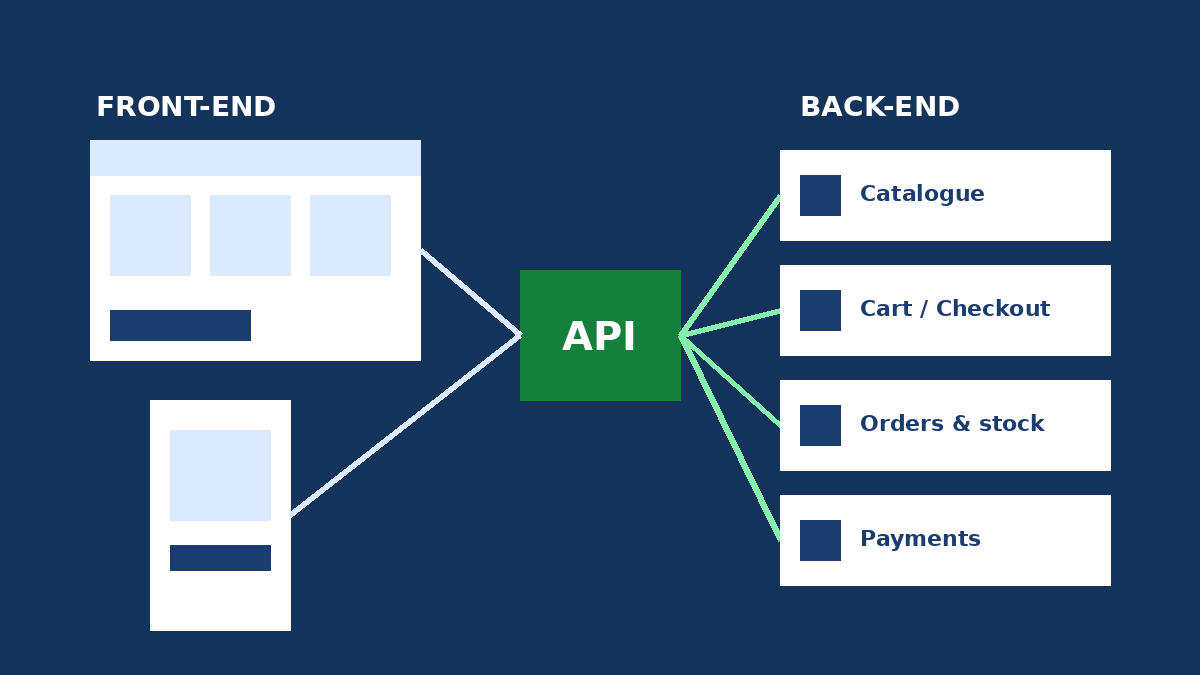
Headless commerce means separating the customer-facing storefront from the ecommerce engine that runs your catalogue, cart, orders and payments, with the two talking through an API. It pays off when your theme genuinely limits design, content or multichannel selling. For most stores, a well-optimized theme still delivers a better return.
"Should we go headless?" comes up in almost every replatforming or redesign conversation. The question got sharper this autumn: Shopify turned Hydrogen into a library that works with any JavaScript framework, and Webflow-plus-Shopify setups are more common than ever.
This guide is for founders, ecommerce managers and marketing teams weighing a rebuild. It covers what headless really delivers, what it costs, how it affects SEO, and how to approach it on Shopify, WooCommerce and Webflow.
What is headless commerce?
A traditional, monolithic store runs everything on one platform: admin, data and page rendering. On Shopify that is the Liquid theme, on WooCommerce the WordPress theme, on Webflow the pages built in the Designer.
A headless architecture removes the "head". The commerce engine still manages products, prices, inventory, orders and checkout, but exposes that data through an API. A separate front-end, typically built with Next.js, React Router, Nuxt or Astro, renders the pages and calls the API to read the catalogue or update the cart.
There is also a middle path that often makes the most sense: a hybrid architecture, for example a content-led site in Webflow or WordPress with the catalogue and checkout handled by Shopify or WooCommerce.
What changed in 2026: Hydrogen is now a library
Going headless on Shopify used to mean adopting Hydrogen as a full framework built on React Router. On October 14, 2026, Shopify announced the general availability of Hydrogen 2026-10: it is no longer a framework but a JavaScript library you add to the stack you already use.
According to Shopify, it handles the cart, product variants, collection filters, predictive search, Markets, analytics, Shop Pay and customer accounts. Starters exist for React Router and Next.js, and you can host anywhere, including Oxygen, Shopify's hosting, which remains free. The Hydrogen and Oxygen documentation lists Oxygen as included at no extra charge on paid plans from Starter to Plus.
The practical takeaway: the technical barrier to entry is lower. But hosting was never the main cost of headless. The real cost is building and maintaining a custom front-end.
The genuine benefits of going headless
Full control over design and content
Your front-end is no longer boxed in by a theme. You can build guided shopping flows, product configurators or rich editorial pages that mix content and products without fighting the rendering engine.
One back office, many storefronts
The same catalogue can power a website, a mobile app, an in-store kiosk or several brands. For multichannel businesses, this is the strongest argument for headless.
Potentially better performance
A well-built front-end, rendered on the server and cached at the edge, can achieve excellent Core Web Vitals. Note the word "potentially": a JavaScript-heavy headless front-end can easily be slower than a well-tuned Shopify or WooCommerce theme.
The costs and risks teams underestimate
- Two systems to maintain. The commerce back end and the front-end evolve separately, and every API, framework or dependency update needs developer time.
- Apps and plugins stop "just working". On Shopify, apps that inject into the Liquid theme (reviews, loyalty, bundles) do not appear automatically on a headless storefront. On WooCommerce, extensions that modify product pages or the cart in PHP have to be rebuilt on the front-end.
- Marketing loses autonomy unless you plan a CMS or page builder. Changing a banner should not require a developer.
- Analytics and ad tracking must be rebuilt, including consent management.
- Technical SEO becomes entirely your responsibility: tags, redirects, sitemaps, structured data and pagination. More on that below.
Headless on Shopify, WooCommerce and Webflow
Shopify: Hydrogen and the Storefront API
Shopify has the most mature headless ecosystem. Your front-end queries the Storefront API (GraphQL) through Hydrogen, and payments still run through Shopify Checkout. Shopify recommends keeping the /products/:handle URL format for products, or adding a server-side redirect to your own structure. For the classic set-up, see our Shopify vs WooCommerce comparison.
WooCommerce: the Store API
WooCommerce provides the Store API, a public REST API for products, cart and checkout under /wp-json/wc/store/v1/. Write operations such as adding to the cart require a Nonce or Cart Token. For sensitive data and admin tasks, you use the authenticated WooCommerce REST API instead.
Headless WooCommerce gives you complete freedom and no platform subscription, but it needs a team comfortable with both WordPress and JavaScript. Before you commit, confirm that your payment gateway and key extensions support the Store API. Our WooCommerce development team runs this kind of compatibility audit.
Webflow: often the best hybrid option
Webflow shines for design and content, but its native ecommerce is limited for large catalogues. There is no official Shopify-built app on the Webflow integrations marketplace. You have three routes: embed Shopify's Buy Button, use a third-party sync app that copies Shopify products into the Webflow CMS, or build a custom integration on the Storefront API. Our Webflow SEO guide covers the settings to get right.
Monolithic vs hybrid vs headless
| Criterion | Monolithic theme | Hybrid (Webflow or WordPress + Shopify or WooCommerce) | Fully headless |
|---|---|---|---|
| Design freedom | Good, within theme limits | Very good on content pages | Complete |
| Time to launch | Short | Medium | Long |
| Build budget | Lowest | Mid-range | Highest |
| Maintenance | One platform | Two tools plus an integration to monitor | Custom front-end maintained continuously |
| Apps and extensions | Work out of the box | Work on the store side | Re-integrated one by one |
| Marketing autonomy | High | High | Depends on the CMS you add |
| Best fit | Most SMBs and brands | Content-led brands, mid-size catalogue | Multichannel, multi-brand, in-house tech team |
7 questions to decide whether to go headless
- What specific limitation does your current theme impose? If you cannot name one, headless is not the answer.
- Do you sell across several channels (web, app, retail, multiple brands) from the same catalogue?
- Do you have a developer or agency on retainer to maintain the front-end long term?
- How many critical apps would need rebuilding: reviews, loyalty, subscriptions, filters, translation?
- Does marketing need to publish pages and campaigns every week without developers?
- Is your store slow because of the theme, or because of images, third-party scripts and too many apps? The second can be fixed without a rebuild.
- Will the expected gain cover three years of development and maintenance?
If you answer yes to most of questions 1 to 3, a headless or hybrid architecture deserves a serious look. Otherwise, a well-executed theme redesign usually delivers a better ROI.
Example: a cosmetics brand selling from Tunisia to Europe
Consider an illustrative case: a Tunis-based brand with 150 products on Shopify, a content-rich beauty blog and seasonal campaigns. The marketing team cannot build ambitious editorial pages in the theme.
- Ruled out: a fully headless Next.js build. It would mean rebuilding the reviews and loyalty apps, and the company has no in-house developer.
- Chosen: a hybrid architecture. Editorial and campaign pages live in Webflow, products sync from Shopify, and cart and checkout stay on Shopify.
- Watch-outs: one canonical URL per product, unified GA4 tracking across domains or subdomains, and a redirect map before launch.
If the project involves a platform or URL change, follow our ecommerce migration SEO checklist.
Headless commerce SEO checklist
Google can render JavaScript, but its JavaScript SEO basics still recommend server-side rendering or pre-rendering as better for users and crawlers. For a headless store:
- Render product and category pages on the server (SSR) or statically, with content in the initial HTML.
- Generate the title, meta description, canonical and
hreflangtags for every URL. - Output Product structured data and an XML sitemap from the API, updated automatically.
- Return real HTTP status codes: 404 for removed products, 301 for moved URLs, never an empty page with a 200.
- Use real
<a href>links for navigation, indexable filters and pagination. - Test key templates with the URL Inspection tool in Search Console before launch.
Conclusion: headless is a means, not a goal
Headless commerce is powerful for multichannel, content-heavy brands with technical resources. The 2026 changes, from Hydrogen as a library to free Oxygen hosting, make headless Shopify more accessible. Yet for most stores, a fast, well-designed theme or a hybrid set-up delivers the same commercial gains at a fraction of the cost and maintenance.
Agence Web Tunis designs and builds WooCommerce, Shopify and Webflow stores, classic, hybrid or headless, for businesses in Tunisia and Europe. Explore our ecommerce website development services or ask us for an honest architecture recommendation for your project.